Platform:WinXP,Windows2000,Windows2003,Windows Vista Ultimate,Win98,WinME,WinNT 3.x,WinNT 4.x,Win95,Windows Vista Starter,Windows Vista Home Basic,Windows Vista Home Premium,Windows Vista Business,Windows Vist
Sib Icon Extractor is a handy tool for extracting icons from almost any location, be it a local folder, a zip-archive, a Mac OS icon file or even a website. You can also rejuvenate the look of your desktop with new icons in a couple of clicks.
Sib Icon Extractor is a handy tool for any fashion-conscious user. It allows you to scan and extract icons from virtually any location, be it a local file or folder, zip-archive, rar-archive, Mac OS file or a website. Collected icons are stored in libraries where you can easily sort or locate them and view detailed information about each icon.
You can choose to view collected icons in various display modes, for example, 16x16, 32x32, 48x48, Monochrome, 16 Colors, 256 Colors or True Color. Added to this is the ability to export icons to ICO, PNG, JPG, CUR, GIF, XPM and BMP file formats; archive icons in ZIP files, delete duplicate icons and split icon libraries into individual icon files.
Sib Icon Extractor also enables you to customize the look of Window by replacing default icons with the new and trendy ones. You can change the icons of your desktop, start menu, drives, folders and customize a wide variety of desktop settings. By replacing standard icons, you can give your desktop a more personalized and stylish look.
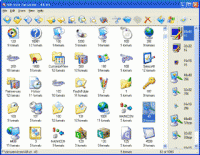
The program has a classic, one-window interface where all commands and operations can be easily located on the toolbar when you need them. Icons are displayed in the main window with the detailed information about their source, format, and number. Thanks to the simple interface architecture, you can start working with the program in seconds without the need to learn a detailed help-file.
SibCode designs a lot of icon sets and develops software for icon editing and toolbar design also. It plans to release the following icon sets: Android Icon Pack, Small Funny Icons, Real Cute Icons, Desktop Vista Icons, Small Software Icons, Ready Desktop Icons, Sunny Toolbar Icons, Style Toolbar Icons, Lab Buddy Icons, Perfect Lab Icons.
Coming soon: iPhone Icon Extractor Whats new in version 3.30: Added: Compatibility with 64-bit Windows Requirements: 32 MB RAM, Pentium-233 MHz, 8 MB Hard Disk Operating system: WinXP,Windows2000,Windows2003,Windows Vista Ultimate,Win98,WinME,WinNT 3.x,WinNT 4.x,Win95,Windows Vista Starter,Windows Vista Home Basic,Windows Vista Home Premium,Windows Vista Business,Windows Vist Limitations: Nag screen; Individual icon library items can not be saved Release notes: Major Update
See the current day of the week, month, date of the month at a glance from the system tray without hovering the mouse over the clock; Automatic desktop wallpaper changing at pre-determined interval.
Price: $ 19, Rating: 10, Downloads: 158 Download
Image Converter can convert image type and change image size and add watermark and add frame, It supports 14 kinds of image formats, such as BMP, WBMP, JPEG, PNG, TIF, GIF, PCX, TGA, ICO, PSD, JP2, J2K, DCX, and PDF, et al.
Price: $0, Rating: 0, Downloads: 107 Download
Abonsoft True Color Icon Converter can convert any images to true color icons of any size. It can also extract icon from any file or from any folder, then convert to a new icon. It can convert icon to images too.
Price: $24.99, Rating: 8, Downloads: 96 Download

 Sib Icon Extractor 3.30 details